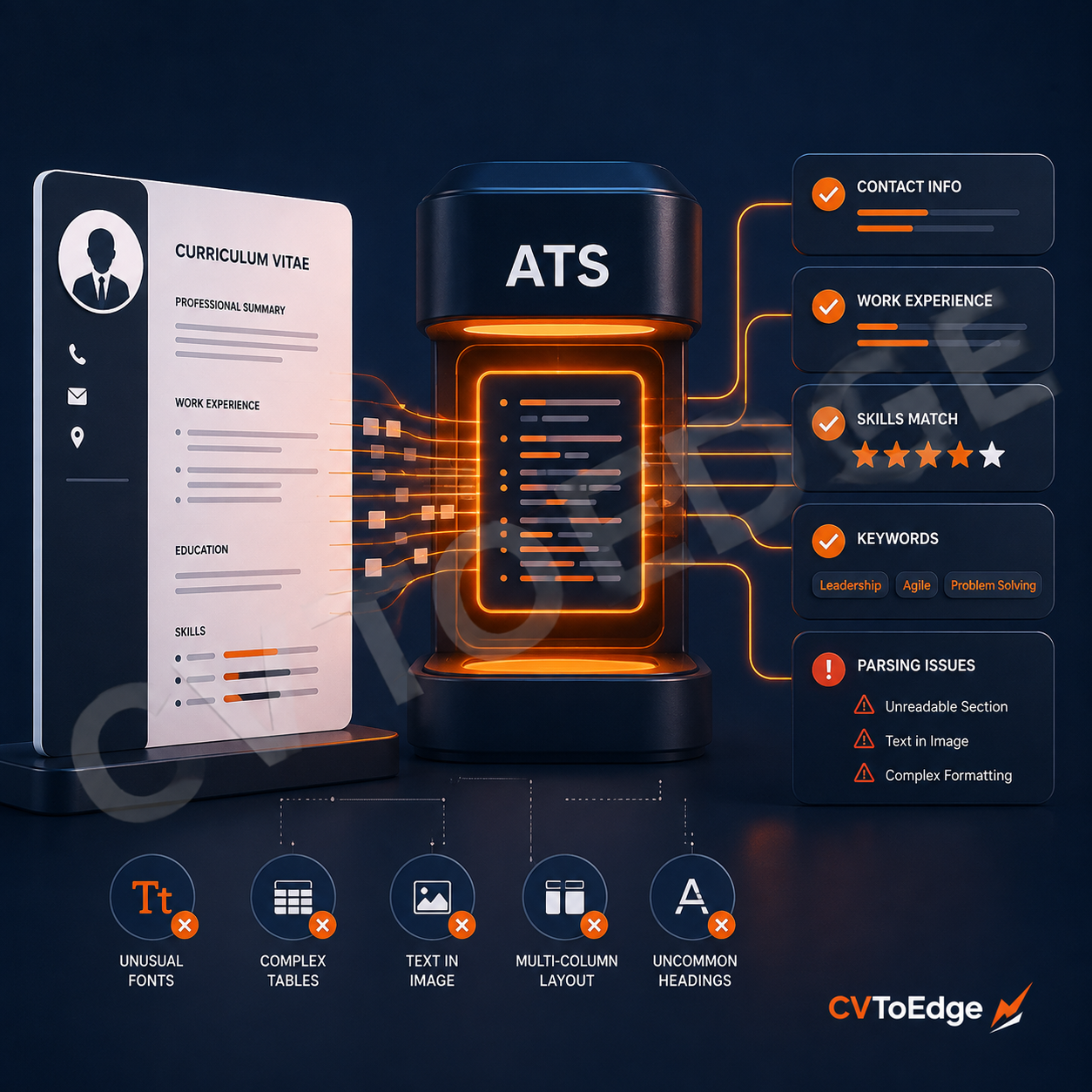
An ATS does not look at your CV the way a person does. It needs to extract text, identify sections, recognise job titles and skills, and compare your information with the job requirements.
You can have the right skills, relevant experience, and strong achievements, yet still create a problem before a recruiter reads your CV.
The reason is often how an Applicant Tracking System, or ATS, reads the document.
An ATS does not look at your CV the way a person does. It needs to extract text, identify sections, recognise job titles and skills, and compare your information with the job requirements. If your CV is difficult for the system to read, important details may be missed or extracted incorrectly.
How an ATS reads your CV
Most modern ATS platforms process your CV in stages.
First, the system receives the file. This might be a PDF, DOCX, or another supported format.
Next, the system extracts the text. It tries to identify information such as:
Your name and contact details
Professional summary
Job titles and employers
Employment dates
Education
Skills
Certifications
Keywords that match the role
The system may then organise that information into fields inside a candidate profile. A recruiter can search and filter candidates using job titles, skills, locations, experience, and other information.
This is where your CV structure matters.
A document can look excellent on your screen but produce messy results when software tries to turn it into structured data.
A simple way to understand CV parsing
Imagine copying your CV into a plain text editor.
If the information still appears in a logical order, the ATS will usually have a better chance of reading it correctly.
If the text becomes jumbled, appears in the wrong order, or disappears completely, you may have a parsing problem.
This does not mean every ATS handles every format the same way. Different platforms have different parsing capabilities. Still, clear structure gives you the best chance across systems.
What can go wrong when an ATS parses your CV?
Text can appear in the wrong order
Multi-column CV layouts often cause problems.
A human can easily understand a design with your work experience on the left and your skills on the right. Some systems may extract one column first, then the other. Others may mix lines together.
Your CV could end up looking like this:
Senior Software Engineer
Laravel
2023 to Present
React
ABC Company
PostgreSQL
The information is still present, but the order makes it harder for the software to understand the relationship between the details.
A simple single-column layout reduces this risk.
Important information may sit inside an image
An ATS cannot reliably use text that exists only inside an image.
This often happens with:
Logos
Decorative skill charts
Image-based CV templates
Scanned documents
Graphics containing contact details or skills
For example, placing your skills inside a beautiful image may look impressive to a human. The ATS may never read those skills.
Keep important information as real, selectable text.
Tables can confuse the parser
Tables can help control a CV layout, but complex tables can create problems when an ATS extracts text.
Information may move out of sequence. A job title could separate from its employer or employment dates.
If you use a table, keep it simple. Avoid placing large parts of your work history inside complex layouts.
Text boxes and floating elements may not parse well
Many modern CV templates rely on text boxes and floating design elements.
These can look polished, but they add another layer between your information and the parsing system.
Your name, contact details, professional summary, or skills should not depend on floating elements to remain readable.
Unusual section headings can cause confusion
Clear headings make your CV easier to scan.
Use familiar names such as:
Professional Summary
Work Experience
Education
Skills
Certifications
Creative headings may sound interesting, but they can make it harder for software to identify the section.
For example, "Where I've Made an Impact" is less obvious than "Work Experience."
You do not need to make your CV boring. You just need to make its structure clear.
Keywords may be missing or poorly matched
An ATS cannot credit you for experience that you have not clearly stated.
Suppose a job requires "project management" and your CV only says:
Managed projects and coordinated tasks.
A recruiter may understand what you mean. A keyword search may not always make the same connection.
If "project management" genuinely describes your experience, use the standard term where it fits naturally.
The same applies to technical skills, tools, certifications, and job titles.
Keywords still need context
Stuffing a CV with keywords is a bad strategy.
A long block of unrelated terms may make the document harder to read and can create problems during screening.
Instead, use relevant keywords in context.
For example:
Led cross-functional teams and managed software projects using Agile methodologies.
This is better than:
Project management. Agile. Scrum. Leadership. Jira. Teamwork. Communication.
The first example shows how the candidate used the skills.
Formatting symbols can create noise
Special characters, icons, unusual fonts, and decorative separators can sometimes produce strange results during text extraction.
Keep formatting straightforward.
Use standard fonts. Use clear headings. Use simple bullet points. Avoid putting essential information inside decorative shapes.
Your CV does not need to look like a plain document from twenty years ago. It simply needs to balance visual quality with readability.
File type matters too
Always follow the employer's instructions.
If the application asks for a PDF, submit a PDF. If it asks for a Word document, submit a Word document.
When the employer gives no instruction, use a format that your target application system accepts.
Also test the actual file you plan to upload. Do not assume that the source document and exported PDF behave the same way.
Test your CV before you apply
A quick test can reveal obvious parsing issues.
Copy all the text from your CV.
Paste it into a plain text editor.
Check whether the information appears in a sensible order.
Confirm that your name, contact details, job titles, dates, skills, and work history are present.
Check the final file for spelling errors and formatting problems.
You should also review your CV against the job description. Make sure your relevant skills and experience use language that accurately reflects what the employer needs.
A better approach to ATS-friendly design
The goal is not to design your CV for a robot and ignore the human who will eventually read it.
The best CVs work for both.
An ATS needs clear text and a logical structure. A recruiter needs information they can scan quickly. A good CV gives both exactly that.
Use a clean layout. Keep your sections easy to identify. Write your experience in clear language. Use relevant keywords naturally. Avoid design choices that hide or scramble important information.
A well-designed CV should communicate your value before anyone has to struggle to find it.
Check how your CV performs with CVToEdge
CVToEdge helps job seekers create and improve professional CVs with tools that support clearer formatting, stronger content, and ATS-friendly structure. You can use it to review your CV, identify areas for improvement, and build a document that works better for both applicant tracking systems and recruiters. Register & Subscribe today.